# 跑通相芯示例项目 (/zh-CN/solutions/showroom/build/beauty/faceunity-run-project)
> For AI agents: see the complete documentation index at [llms.txt](/llms.txt).
<_PlatformTabsGroup>
<_PlatformProcessedMarker groupMode="structured" canonicalPlatform="android" platform="android" />
## 前提条件 [#前提条件]
本文介绍如何快速跑通 `BeautyAPI` 示例项目,体验相芯美颜效果。开始前,请确保满足以下前提条件:
- [Git](https://git-scm.com/downloads)
- [Java Development Kit](https://www.oracle.com/java/technologies/javase-downloads.html) 11
- [Android Studio](https://developer.android.com/studio/) 3.5 及以上
- [开通秀场直播服务](/zh-CN/solutions/showroom/build/enable-service)
- Android 手机,版本 Android 5.0(API Level 21)及以上
:::warning[注意]
声网推荐使用真机运行项目。部分模拟机可能存在功能缺失或者性能问题。
:::
## 克隆仓库 [#克隆仓库]
运行以下命令克隆仓库到本地:
```shell
git clone git@github.com:AgoraIO-Community/BeautyAPI.git
```
## 集成第三方美颜 SDK [#集成第三方美颜-sdk]
按照如下步骤进行集成:
1. 联系相芯技术支持获取最新的美颜 SDK、美颜资源、美颜证书。
2. 下载并解压美颜资源,然后将资源中如下文件添加到美颜示例项目对应的文件路径下:
| SDK 文件 | 项目路径 |
|-----|-----|
| 美妆资源:例如 `naicha.bundle` | `app/src/main/assets/beauty_faceunity/makeup` |
| 贴纸资源:例如 `fashi.bundle` | `app/src/main/assets/beauty_faceunity/sticker` |
| 证书:`authpack.java` | `app/src/main/java/io/agora/beauty/demo/authpack.java` |
3. 在 `app/build.gradle` 文件中,将 `applicationId` 修改为你的包名,例如 `com.example.app`。包名用于在设备上唯一标识应用程序。在开发应用时,你需要设置包名。在此处设置的包名需要与你申请美颜 SDK 时提供的包名一致。
```kotlin
android {
defaultConfig {
applicationId "io.agora.entfull"
...
}
}
```
## 配置示例项目 [#配置示例项目]
运行美颜项目前,你需要在 `local.properties` 文件中添加并设置如下参数:
```kotlin
AGORA_APP_ID = "YOUR_APP_ID"
```
你可以在[创建声网项目](/zh-CN/solutions/showroom/build/enable-service#创建声网项目)后,从控制台获取参数的值,详情如下:
| 参数 | 描述 | 获取方式 |
|----|----|----|
| `AGORA_APP_ID` | 声网项目的 App ID | [获取 App ID](/zh-CN/solutions/showroom/build/enable-service#获取-app-id) |
## 编译并运行示例项目 [#编译并运行示例项目]
按照如下步骤进行操作:
1. 开启 Android 设备的开发者选项,打开 USB 调试,通过 USB 连接线将 Android 设备接入电脑。
2. 用 Android Studio 打开 `BeautyAPI/Android` 文件夹。
3. 在 Android Studio 中,点击 **Sync Project with Gradle Files** 按钮,让项目与 Gradle 文件同步。
4. 待同步成功后,点击 `Run 'app'`。片刻后,美颜应用便会安装到你的 Android 设备上。
5. 打开美颜应用,进行体验。
<_PlatformProcessedMarker close="true" />
<_PlatformProcessedMarker groupMode="structured" canonicalPlatform="android" platform="ios" />
本文介绍如何快速跑通 `BeautyAPI` 示例项目,体验相芯美颜效果。
## 前提条件 [#前提条件-1]
开始前,请确保满足以下前提条件:
- [Git](https://git-scm.com/downloads)
- [CocoaPods](https://guides.cocoapods.org/using/getting-started.html#getting-started)
- [Xcode](https://apps.apple.com/cn/app/xcode/id497799835?mt=12) 13.0 及以上
- 有效的苹果开发者账号
- [开通秀场直播服务](/zh-CN/solutions/showroom/build/enable-service)
- iOS 设备,版本 11.0 及以上
:::warning[注意]
声网推荐使用真机运行项目。部分模拟机可能存在功能缺失或者性能问题。
:::
## 克隆仓库 [#克隆仓库-1]
运行以下命令克隆仓库到本地:
```shell
git clone git@github.com:AgoraIO-Community/BeautyAPI.git
```
## 集成第三方美颜 SDK [#集成第三方美颜-sdk-1]
按照如下步骤进行集成:
1. 联系相芯技术支持获取最新的美颜 SDK、美颜资源、美颜证书。
2. 下载并解压美颜资源,然后将如下文件添加到美颜示例项目对应的文件路径下:
| 文件 | 项目路径 |
| --- | --- |
| `https://github.com/Faceunity/FULiveDemo/tree/master/FURenderKit/Resources/model` | `iOS/FULib/Resources/model/*.bundle` |
| `https://github.com/Faceunity/FULiveDemo/tree/master/FURenderKit/Resources/graphics` | `iOS/FULib/Resources/graphics/*.bundle` |
| 美妆资源:例如 `naicha.bundle` | `iOS/FULib/Resources/美妆/*.bundle` |
| 贴纸资源:例如 `fashi.bundle` | `iOS/FULib/Resources/贴纸/*.bundle` |
| 证书:`authpack.h` | `iOS/BeautyAPi/FUBeauty/authpack.h` |
## 配置示例项目 [#配置示例项目-1]
按照如下步骤进行配置:
1. 运行美颜项目前,你需要在 `iOS/BeautyAPi/KeyCenter.swift` 文件中设置如下参数:
```swift
static let AppId: String = <#YOUR_APP_ID#>
```
你可以在[创建声网项目](/zh-CN/solutions/showroom/build/enable-service#创建声网项目)后,从控制台获取这些参数的值,详情如下:
| 参数 | 描述 | 获取方式 |
|----|----|----|
| `AppId` | 声网项目的 App ID | [获取 App ID](/zh-CN/solutions/showroom/build/enable-service#获取-app-id) |
2. 在 `iOS/` 目录下运行 `pod install`,然后等待依赖库安装完成。
## 编译并运行示例项目 [#编译并运行示例项目-1]
按照如下步骤进行操作:
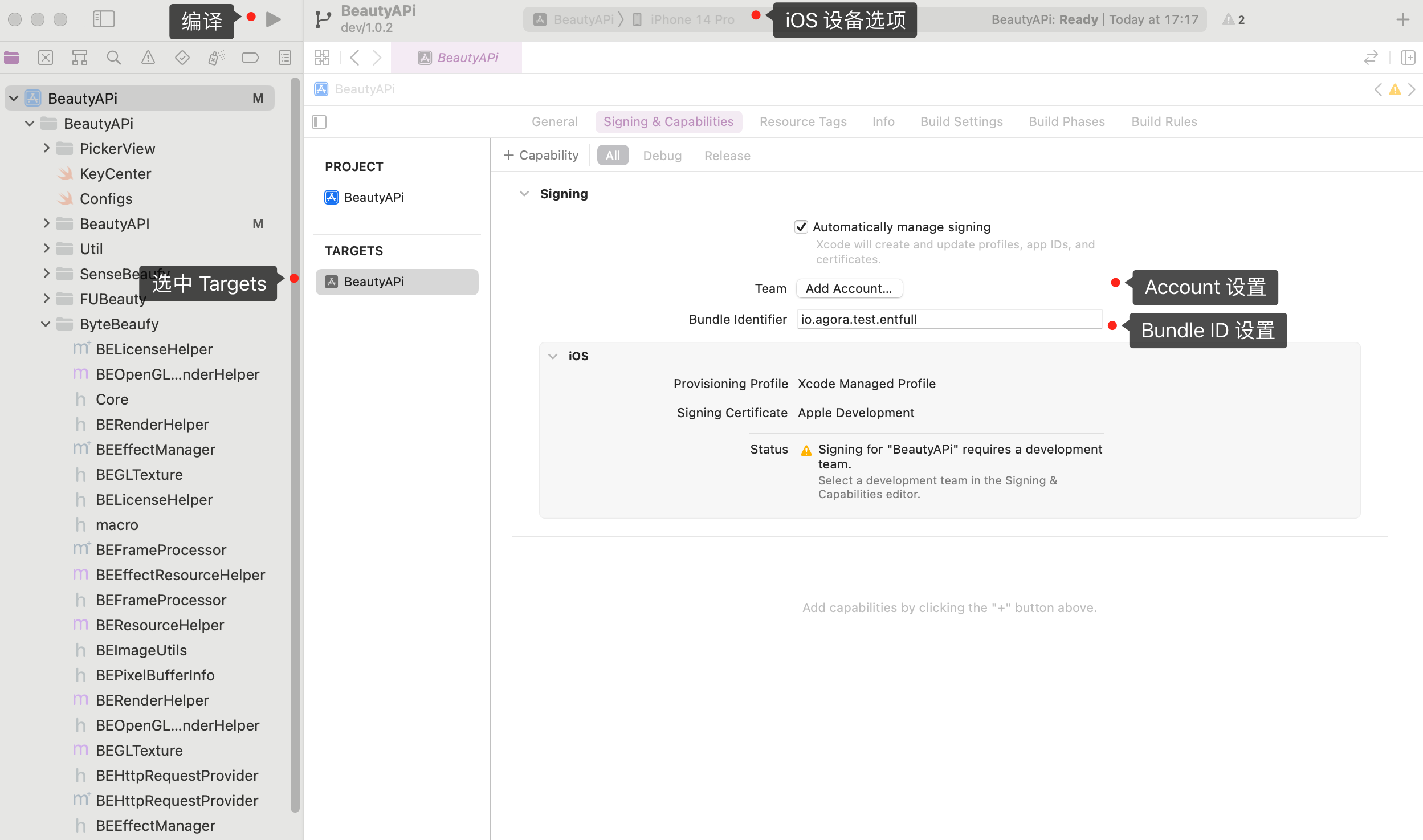
1. 连接上 iOS 设备后,点击 `BeautyAPi.xcodeproj` 文件以通过 Xcode 打开项目,并在 **iOS Device** 选项中勾选上你的 iOS 设备。
2. 在项目 **TARGETS** 下的 **Signing & Capabilities** 界面勾选 **Automatically manage signing**,配置你的苹果开发者账号和 **Bundle Identifier**。Bundle ID 是设备上应用程序的唯一标识。在开发应用时,你需要设置 Bundle ID。在此处设置的 Bundle ID 需要与你申请相芯美颜 SDK 时提供的 Bundle ID 一致。
3. 点击 开始编译。
4. 编译成功后,你的 iOS 设备上会出现美颜应用。在 iOS 系统设置中将该应用设为信任开发者后你才能打开应用。
5. 打开美颜应用,进行体验。
<_PlatformProcessedMarker close="true" />